Voice control smart glasses promise hands-free help, but a smooth demo does not guarantee a useful daily experience. A buyer may need to dictate a message beside a busy road, ask for directions while carrying luggage, or capture a reminder without reaching for a phone. In each moment, microphone clarity, wake-word accuracy, speaker volume, and battery life matter more than a long feature list.
Meta CEO Mark Zuckerberg has said, “I think glasses are the ideal form factor for AI, because you can let it see what you see, hear what you hear.” That vision helps explain the appeal. Yet voice interaction depends on context: wind, accents, background conversations, and unclear commands can all disrupt it. Small frames also leave little room for larger batteries or powerful speakers. Trade-offs are real.
This guide compares seven voice control smart glasses for global buyers, focusing on practical details rather than marketing claims. It considers language and assistant support, comfort during long wear, audio quality, camera options, connectivity, and the clarity of privacy controls. These factors can vary by model and region, so specifications and availability should be checked before purchase. A feature may sound universal, then prove limited in your market. That deserves a second look.
No single pair suits everyone. Some buyers may value discreet calls; others need reliable navigation or quick voice notes. The comparisons that follow aim to make those differences easier to judge, while acknowledging that voice recognition can still miss a word at the worst possible moment.
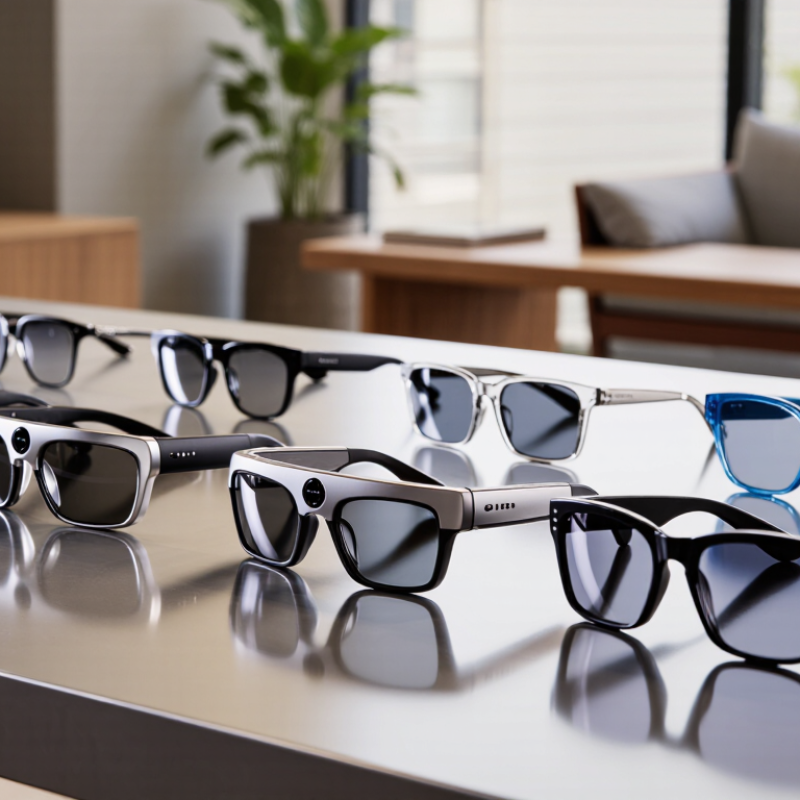
Voice control in smart glasses begins with tiny microphones that capture speech near the wearer’s face. A wake phrase or button tells the device when to listen. Speech-recognition software then turns spoken words into commands, such as taking a photo, reading a message, or adjusting audio. Some glasses process commands on the device; others rely on a paired phone or an online service. The difference can affect speed, features, and what data leaves the glasses. Check the product’s privacy settings and language support before buying. Small details matter.
In a quiet room, a short command may work smoothly. On a windy street, traffic and loose hair can confuse the microphones. Try speaking clearly, without shouting, and pause briefly after the wake phrase. A tone or spoken reply can confirm that the glasses heard you. Not every feature works hands-free, and voice recognition can misunderstand accents or names. That is frustrating. It is also worth testing commands in your everyday setting, rather than relying only on a shop demonstration. Review microphone permissions, too, and learn how to mute listening when you do not need it.
For global buyers, voice control should work with more than one carefully rehearsed phrase. Accent recognition, supported languages, and clear setup instructions can matter as much as microphone quality. Try commands in a quiet room, then near a busy street or a running fan. Short commands help. A specification sheet may not reveal how often you need to repeat yourself.
Check whether essential controls work without an internet connection, especially when traveling or using limited data. Review what voice recordings are stored, where privacy settings appear, and whether they can be changed easily. Also confirm phone compatibility, charging requirements, and warranty support in your region. A cable that is hard to replace becomes an annoying travel problem.
Comfort deserves a practical test. Wear the glasses for a full walk, not just a quick fitting, and check whether they suit prescription lenses if needed. Battery estimates vary with call time, audio playback, and frequent voice requests, so treat advertised figures as a guide. No single model fits every face or routine. I would compare real-world usability with the feature list; the less glamorous details often decide whether the glasses get used daily.
Seven voice-controlled smart glasses differ less by frame shape than by what happens after a spoken command. Audio-first designs handle calls and reminders well, but can struggle beside traffic. Camera-assisted models add hands-free capture; check how clearly they respond in wind. Display-equipped glasses can show directions in your view, though tiny text is tiring. Translation-focused options are useful at a busy counter, but accents and background chatter still cause errors.
Prescription-ready frames prioritize fit, while rugged designs favor secure hinges and sweat resistance. Budget models often keep controls simple, yet may offer fewer useful voice functions. Small differences matter. Compare microphone placement, response delay, battery life, and whether basic commands work without a phone connection. Try saying a command while walking, not just in a quiet shop.
Grand View Research valued the global smart glasses market at USD 1.93 billion in 2024 and forecast a 13.3% compound annual growth rate from 2025 to 2030. That signals growing interest, not proof that every feature is reliable. For global buyers, check language support, prescription options, warranty coverage, and charging compatibility before ordering. One awkward detail: voice controls can feel effortless in a demo, then miss a command on a windy street.
For global buyers, voice control begins with language support, not a feature count. Check whether glasses recognize your preferred language in commands, dictation, and spoken replies. These can differ. Some models handle basic commands offline but need an internet connection for translation or longer questions. Test accents and speech speed where possible; a quiet showroom may not reveal problems near a busy street. Small details matter.
Connectivity also changes by region. Confirm Bluetooth compatibility with your phone, required app availability, and whether key features work without a specific local service. Cellular functions, if included, may depend on supported network bands and local carrier settings. Do not assume a device sold abroad will connect exactly as it does at home. That can disappoint.
Before buying, review the maker’s regional support page and ask about software updates, warranty coverage, and replacement parts in your country. Check the charging plug and available language settings after setup. Specifications are useful, but they can leave gaps; I would treat unclear regional claims as questions, not promises.
Even a good microphone may struggle with wind or traffic, so voice control should not be the only way to operate essential functions.
Choose voice-control glasses by testing the tasks you will actually use: taking calls, dictating short messages, or asking for directions. Check which languages the assistant understands, and whether it works with your phone’s operating system. A feature list can look impressive, yet poor speech recognition in a busy street quickly becomes frustrating. Fit matters.
Battery life and comfort deserve equal attention. Look for clear runtime figures that distinguish music playback from standby time, since these are different workloads. Try the frames for at least ten minutes; pressure near the temples may appear only after a while. Quiet rooms lie. If possible, test voice pickup outdoors, where wind and traffic can affect commands.
Counterpoint Research reported that global smart-glasses shipments rose 210% year over year in the first half of 2024. That market growth makes careful comparison more useful, not less. Prioritize replaceable nose pads, a weight you can tolerate, and controls that remain usable without looking at a screen. Check charging connectors and language support before buying abroad. Also consider where audio is audible to nearby people. Small compromises matter: a lighter frame may offer fewer controls, and voice recognition may still miss a word. Decide which drawback you can live with.
| Type | Best for | Voice-control capabilities | Typical hardware | Key trade-off | What global buyers should check |
|---|---|---|---|---|---|
| 1. Audio-first open-ear glasses | Calls, music, and hands-free phone assistance | Usually use a phone-connected voice assistant for calls, playback, and basic requests; available commands depend on the phone and companion software. | Small speakers near the ears, microphones, Bluetooth connectivity, and touch or button controls. | Open-ear audio lets users hear surrounding sounds, but may be less private and can be harder to hear in noisy places. | Check phone compatibility, microphone performance in wind, local assistant-language support, and whether audio playback works without a paid service. |
| 2. Camera-enabled voice glasses | Hands-free photos, short videos, and voice-initiated capture | Voice commands may start or stop capture and, on some models, request supported assistant features. | A small built-in camera, microphones, wireless connection, and often open-ear speakers. | Camera quality, recording limits, storage, and available features vary by model; visible recording indicators do not replace respectful consent. | Review local privacy and recording laws, app availability, data-storage terms, and whether the glasses require a specific phone operating system. |
| 3. Display-equipped navigation glasses | Walking directions, notifications, and brief visual prompts | Voice input can request navigation or interact with supported phone functions; the visual display may show concise information. | A near-eye display in one or both lenses, plus microphones and wireless phone connectivity. | Displays can add weight, cost, and power use; visibility and comfort depend on lighting, fit, and the wearer’s vision. | Confirm map coverage, supported languages, display visibility outdoors, prescription options, and local availability of companion apps. |
| 4. Prescription-ready smart glasses | Wearers who need corrective lenses for everyday use | Voice features are generally similar to the device’s audio or camera category; prescription lenses do not inherently add voice functions. | Smart frames designed to accept prescription lenses, with electronics integrated into the frame or arms. | Lens ranges, frame fit, replacement options, and the added cost of prescription lenses differ by supplier and market. | Check accepted prescription limits, lens fitting services, return policies, and whether replacement lenses are available in your country. |
| 5. Lightweight everyday audio glasses | All-day comfort and occasional voice commands | Typically support phone calls and assistant access through a connected phone, with basic onboard controls as a backup. | A conventional-looking frame with compact speakers, microphones, and a rechargeable battery. | A lighter frame may have fewer features or shorter operating time than larger, more feature-rich designs. | Try the fit if possible; verify frame dimensions, battery charging method, replacement-part access, and warranty coverage where you live. |
| 6. Sport-oriented voice glasses | Outdoor activity, hands-free audio, and phone calls | May provide voice access to calls or a phone assistant; accurate recognition can be affected by wind, traffic, and movement. | A more secure frame fit and audio components; some models include water-resistance claims or sport-specific lens options. | Water resistance is not the same as waterproofing, and open-ear speakers may not be suitable where hearing ambient sound is critical. | Check the exact IP rating and its test conditions, lens UV information, secure fit, and any activity-specific safety guidance. |
| 7. Multilingual travel-focused glasses | Travelers who want voice access to navigation, translation, or information | Translation and other advanced assistant features are often app- or cloud-dependent; supported languages and offline functions vary. | Usually combines microphones and speakers with a phone app; some designs also provide a small visual display. | Advanced features may need an internet connection, a compatible app, or an account and may not work equally well in every language. | Verify supported languages and countries, roaming or data needs, offline availability, charging compatibility, and regional service restrictions. |
| Buying note: These are product categories rather than named models. Features, battery life, language support, connectivity, and regional availability vary by device. Voice assistants commonly rely on a paired phone, an internet connection, or both; verify each requirement before purchase. | |||||
Tiny microphones capture speech near your face. A wake phrase or button starts listening, and speech software turns words into commands.
They may take photos, read messages, or adjust audio. Not every feature works hands-free.
It depends on how commands are processed. Some work on the glasses, while others use a paired phone or online service. Check offline controls before traveling.
Speak clearly and pause after the wake phrase. Wind, traffic, and loose hair can confuse the microphones. Try it on a busy street.
Recognition varies by accent and supported language. Test natural phrases, names, and short commands before buying. A specification sheet may not tell the whole story.
Review microphone permissions and recording storage. Find out where privacy settings appear and how to mute listening. Small details matter.
Wear the glasses for a full walk, not just a quick fitting. Battery life can change with calls, audio, and frequent voice requests.
Check phone compatibility, charging needs, replacement cable access, and warranty support in your region. I would weigh daily usability more heavily than a long feature list, though I might still overlook something.
Voice control smart glasses let users interact with useful functions through spoken commands, offering a hands-free alternative to tapping or reaching for a phone. This guide explains how voice recognition, microphones, and connected devices work together, then compares seven types of voice-controlled glasses by practical features such as audio quality, battery life, comfort, privacy controls, and ease of use. It also highlights what international buyers should consider before choosing a pair.
Language support and regional compatibility can vary, so check whether the glasses recognize your preferred languages and work reliably with your phone, network, and commonly used services. Consider where and how you plan to use them, from calls and listening to quick voice requests, and weigh those needs against fit, durability, and cost. By comparing these factors, readers can identify a suitable option without relying on features they may not need.