0%

Computer vision eyewear combines a wearable frame with cameras, sensors, processors, and a small display. Unlike ordinary glasses, it can interpret selected visual information from the user’s surroundings. A camera may detect text, recognize objects, or estimate distance. Software then converts that information into audio, vibration, or a visual prompt near the wearer’s eye.

The process begins with image capture. A forward-facing camera records a scene, while computer vision models analyze shapes, movement, contrast, and written characters. For example, the glasses might identify a doorway, read a short label, or alert a user to nearby movement. Results can appear through augmented-reality lenses or arrive through connected earbuds. Some models also use smartphones or cloud services for heavier processing, which may affect speed, privacy, and performance without internet access.

The technology is promising, but it is not magic. Lighting, camera position, motion, and crowded scenes can reduce accuracy. Reflections may confuse the system. A recognized object may still be misunderstood. That limitation matters in workplaces, public spaces, and accessibility settings. Reliable products should explain their capabilities, testing methods, data practices, and safety boundaries clearly. Users should treat computer vision eyewear as an assistive tool, not an infallible replacement for human judgment. Real-world experience remains essential, because a device that performs well in a laboratory may behave differently on a rainy sidewalk. Clear evidence is still catching up.
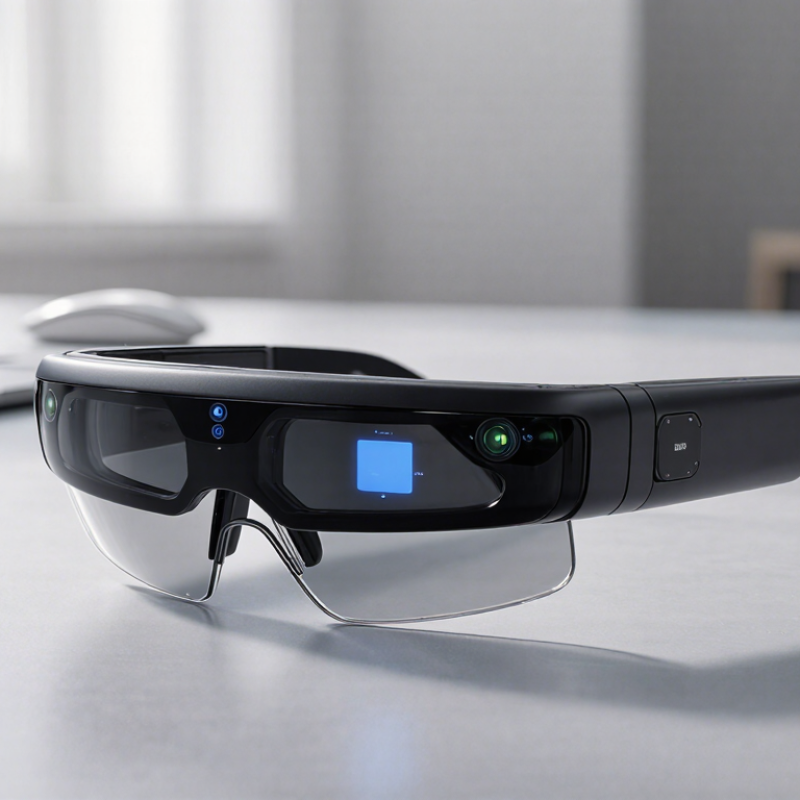
What Is Computer Vision Eyewear and How Does It Work?

Definition and Core Purpose of Computer Vision Eyewear

Computer vision eyewear is wearable technology that helps a person interpret nearby visual information. It usually combines miniature cameras, depth sensors, processors, and a display or audio system. The cameras capture scenes, while software identifies objects, text, movement, and spatial changes. It sees patterns.

Its core purpose is to turn visual data into useful guidance. For example, the eyewear may read a sign aloud, describe a doorway, or warn about an approaching obstacle. Some systems place simple labels in the user’s view. Others deliver spoken information through small speakers. The aim is not to replace human judgment. It is to reduce the effort needed to notice important details.

In practical testing, performance depends on lighting, camera position, network access, and the quality of the training data. A bright street may be easy to analyze, but a dim hallway can confuse the system. Reflections, crowded scenes, and unusual objects create further problems. That matters. Reliable eyewear should communicate uncertainty instead of presenting every answer as fact. Users also need clear controls for recording and data sharing, especially in public spaces. I find the technology promising, but its purpose should remain modest: supporting attention, navigation, and access to information without pretending to understand the world perfectly.

Main Components Used to Capture and Interpret Visual Data

What Is Computer Vision Eyewear and How Does It Work?

Main Components Used to Capture and Interpret Visual Data

Computer vision eyewear begins with compact image sensors mounted near the user’s eyes. These cameras capture faces, text, road edges, and nearby objects. A depth sensor can estimate distance by measuring light travel or image differences. The result is not human sight. It is a stream of pixels, numbers, and uncertain predictions.

An onboard processor converts those pixels into useful information. Neural-network software may identify a door, read printed words, or detect movement. In the Stanford AI Index 2024, the reported cost of running GPT-3.5-level inference fell more than 280-fold between November 2022 and October 2023. That trend supports smaller processors in wearable devices. Still, lower computing costs do not guarantee accurate visual interpretation. Poor lighting, reflective surfaces, and unusual angles remain difficult.

Motion sensors add another layer. Accelerometers and gyroscopes track head movement, while location systems help align digital guidance with the physical scene. A small display, speaker, or vibration unit then delivers the result. According to the International Data Corporation’s 2024 wearable device forecasts, global wearable shipments are expected to exceed 500 million units annually. This scale encourages thinner sensors and longer battery life. Battery limits remain real. Privacy controls also matter, because cameras may capture people who never agreed to be recorded. In my view, the weakest component is often the software’s confidence. It can sound certain while being wrong. That deserves more testing.

What Is Computer Vision Eyewear and How Does It Work?

Representative operating rates of the main components used to capture and interpret visual data.

Cameras capture images in frames per second, depth sensors estimate distance, and inertial measurement units track head motion at a higher sampling rate. An onboard processor then analyzes the combined data to support functions such as object recognition, spatial mapping, and visual guidance.

How Computer Vision Eyewear Processes the Surrounding Environment

Computer vision eyewear uses cameras and sensors to interpret nearby spaces. A small processor analyzes images as the wearer moves. It may identify doors, stairs, text, faces, or common objects. Depth sensors estimate distance, while motion sensors track head direction. This creates a changing map of the environment. The system then presents information through audio, visual overlays, or gentle vibrations.

The process happens quickly, but it is not magic. Software compares visual details with trained patterns and spatial data. For example, it might recognize a sign, read a short label, and speak the words aloud. It may also warn about an object in the walking path. Bright sunlight, darkness, rain, or crowded scenes can reduce accuracy. A misplaced warning can still cause confusion. Careful testing matters, especially when the wearer depends on spoken guidance.

Tips: Keep the lenses and cameras clean. Start in familiar spaces. Check important information independently. Do not treat every alert as certain. A human observer may notice details the system misses. Regular software updates can improve recognition, though they cannot remove every limitation.

What Is Computer Vision Eyewear and How Does It Work? — How Computer Vision Eyewear Processes the Surrounding Environment
Processing Dimension Typical Hardware or Method Environmental Information Captured How the Information Is Processed Result for the Wearer Important Constraints
Image Capture One or more miniature RGB cameras positioned on the frame Visible-light images, edges, colors, textures, objects, signs, and people within the camera's field of view Frames are converted into digital data and analyzed individually or as a continuous video stream The eyewear can identify visual features and provide context about nearby surroundings Performance decreases in darkness, glare, fog, heavy motion, or when objects are partly blocked
Depth Estimation Stereo cameras, depth sensors, structured-light systems, or software-based depth estimation Relative distance, surfaces, object position, and approximate three-dimensional layout The system compares images from multiple viewpoints or estimates depth from visual patterns and motion Objects and surfaces can be placed more accurately in the wearer's immediate environment Depth accuracy depends on texture, lighting, camera separation, sensor range, and reflective surfaces
Motion and Orientation Tracking Inertial measurement unit containing an accelerometer and gyroscope; sometimes a magnetometer Head rotation, acceleration, movement direction, and changes in viewing angle Sensor readings are combined with camera data through sensor-fusion algorithms Digital information can remain aligned with the user's head movement or field of view Small sensor errors can accumulate over time, producing alignment drift without visual correction
Scene Recognition Computer-vision models for classification, detection, segmentation, or tracking Objects, surfaces, pathways, text regions, faces, gestures, and general scene categories Machine-learning models compare visual patterns with learned representations and assign labels or locations The system may describe, highlight, count, or track relevant elements in the environment Recognition can be affected by unusual objects, poor camera angles, low light, occlusion, and model bias
Text and Sign Reading Optical character recognition combined with image enhancement and language processing Printed text, digital displays, labels, menus, road signs, and document content The image is cropped, corrected for perspective, converted into text, and optionally translated or summarized Text may be displayed visually or communicated through audio output Accuracy depends on font size, contrast, focus, camera stability, language support, and viewing angle
Object Tracking Feature tracking, optical flow, object-detection models, and temporal analysis Changes in the position and movement of selected objects across successive frames The system links the same object across frames and estimates its movement relative to the wearer Moving vehicles, people, tools, or other items can be followed more consistently Tracking may fail when objects overlap, leave the camera view, change appearance, or move rapidly
Spatial Mapping Visual-inertial odometry, simultaneous localization and mapping, and surface reconstruction Room boundaries, planes, obstacles, landmarks, and the eyewear's estimated position Camera frames and motion data are combined to build or update a spatial model of the nearby area Virtual indicators can be anchored to floors, walls, tables, or other recognized surfaces Mapping quality is limited by sensor range, insufficient visual detail, fast movement, and changing environments
Decision and Context Layer Rule-based logic, machine-learning inference, and optional cloud or edge computing Relationships between recognized objects, user commands, location context, and task requirements The system combines sensor outputs to determine which information is relevant at a particular moment Only selected alerts, labels, instructions, or descriptions are presented instead of raw sensor data Cloud processing may introduce network delay and raises additional privacy and data-handling considerations
User Feedback Micro-displays, waveguides, speakers, bone-conduction transducers, vibration motors, or LEDs Processed results such as labels, warnings, navigation prompts, and system status Information is converted into visual, audio, or haptic signals according to the user's settings The wearer receives assistance without continuously looking at a separate screen Visual overlays must remain readable; audio can be masked by background noise; excessive alerts can distract the user
Latency and Responsiveness On-device processors, dedicated AI accelerators, optimized software pipelines, and wireless connectivity Time-sensitive camera, motion, and interaction data Data passes through capture, inference, decision, and feedback stages before the result is delivered Lower processing delay generally produces more natural tracking and more timely environmental assistance Latency varies with resolution, model complexity, processor load, wireless conditions, and whether processing is local or remote
Power and Thermal Management Rechargeable battery, power-management circuitry, low-power sensors, and duty-cycling controls Energy consumption from cameras, processors, displays, radios, and audio systems The device adjusts sensor activity, processing frequency, brightness, and connectivity to balance performance and battery life Longer operating time with reduced heat and more stable operation Continuous camera use, high-resolution processing, bright displays, and wireless transmission increase power demand
Privacy and Data Handling Recording indicators, physical camera controls, encryption, local processing, permissions, and data-retention settings Images, audio, recognized text, location information, and interaction history Systems may process data locally, transmit selected data to a paired device or server, or delete temporary data after analysis The wearer can receive computer-vision assistance while maintaining greater control over collected information Camera use in public or private spaces may affect bystanders; privacy practices depend on device settings and software design
Computer vision eyewear does not interpret the environment through a single sensor. It typically combines camera data, motion measurements, software models, and user-feedback systems to create a real-time representation of nearby surroundings.

Ways Visual Information Is Delivered to the Wearer

Computer vision eyewear combines cameras, processors, and a small display near the eye. It observes scenes, identifies objects, and presents selected visual information. The World Health Organization reports that at least 2.2 billion people have near or distance vision impairment worldwide (World Report on Vision, 2019). This makes readable, adjustable output more than a technical preference.

The first delivery method is optical overlay. Transparent lenses place arrows, labels, or text over the real environment. A navigation cue may appear beside a doorway, not across it. The second method is a camera-to-display view. Cameras capture the scene, while the eyewear shows an enhanced image on an internal screen. This approach can enlarge contrast, highlight edges, or translate printed words. It also introduces delay. Small delays matter when the wearer walks.

Audio and vibration can support visual delivery. Spoken descriptions may explain a detected object, while a temple vibration can signal direction. The 2024 XR Industry Survey by the XR Association and Perkins Coie identified privacy, safety, and cost as major adoption concerns. These concerns affect how much information the system should display. Too many labels create clutter. Too little information feels useless. The boundary is still messy. Research on accessibility remains uneven, especially for changing light and crowded streets. A practical system should let wearers adjust brightness, text size, contrast, and notification strength. It should also show uncertainty when recognition is imperfect. That honesty is easy to overlook.

Practical Uses, Benefits, and Current Limitations

What Is Computer Vision Eyewear and How Does It Work?
Practical Uses, Benefits, and Current Limitations

Computer vision eyewear combines cameras, processors, sensors, and audio or visual feedback. It identifies text, objects, faces, signs, and nearby obstacles. Some systems process data locally, while others use connected software. The World Health Organization and UNICEF report that more than 2.5 billion people need assistive products worldwide. This makes hands-free visual support especially relevant.

In practice, users may hear a street sign read aloud or receive warnings about obstacles. Workers can inspect equipment without holding a phone. People with low vision may gain more independence in familiar environments. The WHO’s World report on vision estimates that at least 2.2 billion people experience near or distance vision impairment. The promise is real.

However, computer vision eyewear remains imperfect. Cameras can misread dim lighting, unusual objects, or crowded scenes. Recognition may also fail when text is blurred or partly blocked. Battery capacity, processing delays, heat, and internet dependence affect daily use. Privacy requires careful design, especially when cameras operate around other people. NIST evaluations of biometric systems have also shown that accuracy can vary across demographic groups and image conditions. I would not treat an automated description as proof. Independent testing, clear consent, and human judgment still matter.

FAQS

What is computer vision eyewear?

It is wearable equipment that uses cameras, sensors, and software to interpret nearby scenes. It can recognize text, objects, signs, and obstacles. It does not see like a human. It processes pixels and uncertain predictions.

How does computer vision eyewear interpret visual information?

Small cameras capture faces, printed words, road edges, and nearby objects. A processor analyzes those images with recognition software. Depth sensors estimate distance from light or image differences. Poor lighting can still confuse the system.

How does the eyewear present information?

It may display arrows, labels, enlarged text, or stronger image contrast. Speakers can describe objects or read signs aloud. Vibration can signal a direction through the temple area. Too many alerts create clutter.

Can this eyewear help people with low vision?

It may enlarge text, highlight edges, and describe nearby obstacles. A user might hear a street sign while walking. It can support greater independence in familiar places. It is support, not guaranteed sight.

Can workers use computer vision eyewear?

Workers may inspect equipment while keeping both hands available. The system can identify labels, read instructions, or flag nearby objects. Processing delays may matter near moving machinery. Human checking remains necessary.

What are the main limitations?

Recognition can fail with dim light, glare, unusual objects, or blocked text. Crowded streets may produce confusing results. Battery life, heat, internet access, and processing delay affect daily use. Some failures are easy to miss.

How can users adjust the viewing experience?

Useful controls include brightness, text size, contrast, and notification strength. Audio volume and vibration intensity may also need adjustment. A doorway label should not cover the doorway. Settings should change with the environment.

How should users handle privacy and uncertain results?

Cameras may record people who never agreed to be captured. Clear consent, local processing, and visible recording indicators can reduce concerns. The system should show uncertainty instead of sounding perfectly confident. I would not treat an automated description as proof.

Conclusion

Computer vision eyewear is a wearable technology designed to help users understand and interact with their surroundings through visual sensing and intelligent analysis. Its core purpose is to capture information from the environment and convert it into useful guidance, descriptions, or alerts. Key components may include miniature cameras, depth or motion sensors, onboard processors, wireless connections, batteries, and audio or visual output systems. Together, these parts collect details such as objects, text, movement, distance, and lighting conditions.

The system processes visual data by identifying patterns and interpreting what appears in front of the wearer. Results can be delivered through a small display, spoken instructions, sounds, or other accessible feedback. Potential uses include navigation support, reading assistance, workplace guidance, hands-free information access, and educational experiences. Benefits may include improved independence, faster access to environmental information, and more natural interaction with digital tools. However, computer vision eyewear still faces limitations, including battery life, processing speed, accuracy in difficult lighting, privacy concerns, comfort, cost, and the need for user judgment when interpreting automated results.

Eleanor

Eleanor

Eleanor is a professional marketing specialist with in-depth knowledge of the company’s products and a strong understanding of how they can support customers’ needs. She regularly contributes expert articles to the company website, sharing clear, practical insights that help readers understand......